Features / Ideas
Plan
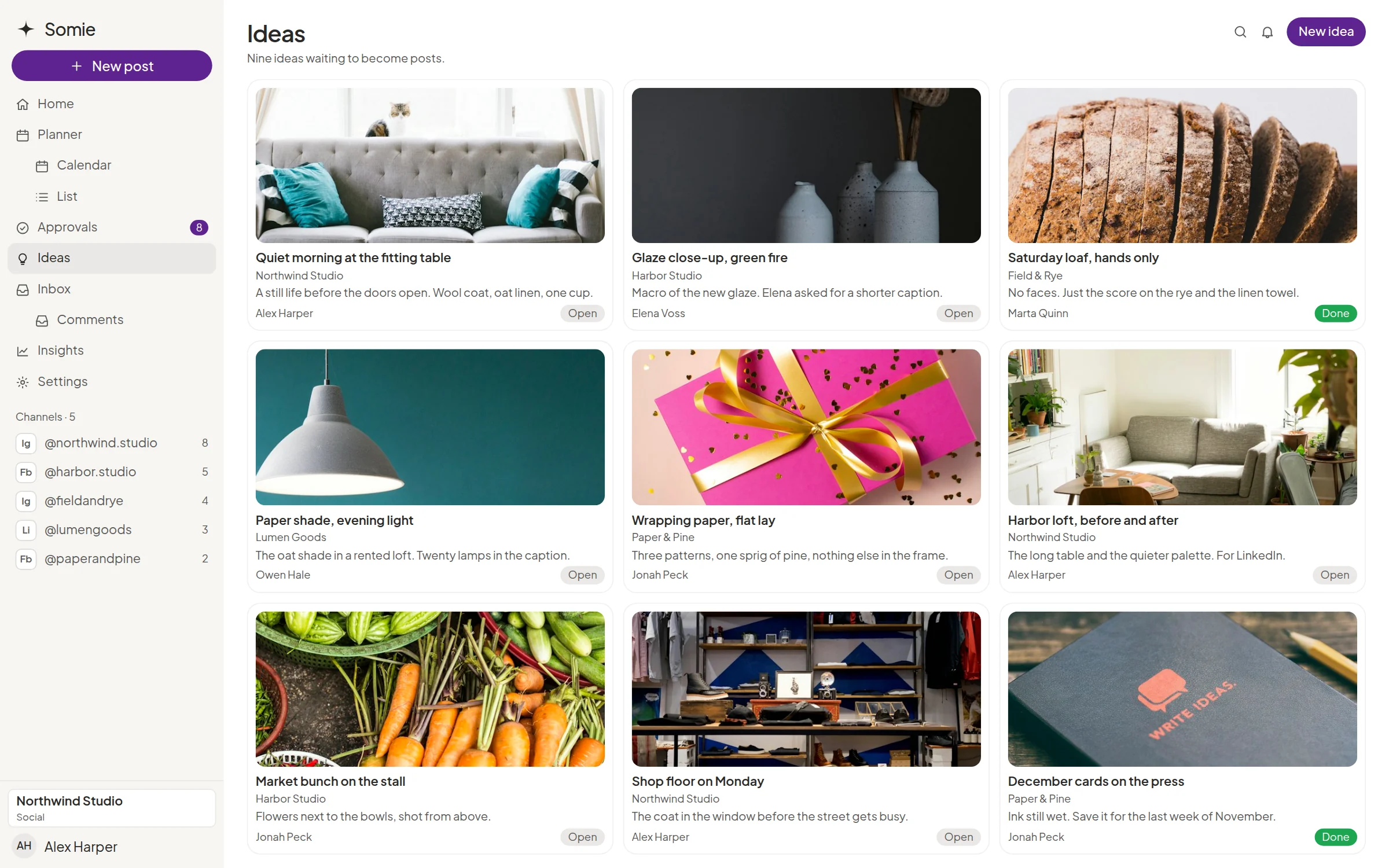
Ideas on a board the client can react to
Ideas is the board that sits before the Planner. Save an idea, give it a status, and talk about it in comments. Replies, mentions, and attachments work here the same way they do on posts.

A board, not a lost chat
Ideas stay on the board for that client space, instead of a thread that scrolls away.

Statuses and comments
Mark where an idea stands and comment on it with the team or the client.

Mentions and files
Mention someone when you need a decision, and attach the reference the idea depends on.
Then it can become the plan
When an idea is ready, the Planner is where it gets a date. Facebook and Instagram can be scheduled from there.

What the client sees
The client can react to ideas in their own space, before the team has promised a date. That is a calmer approval later.
Explore more features
Planner
The month on a calendar and a list, in the client’s own space.

Approvals
The client accepts, requests changes, or moves the date in their own space.
Media drop
Files the client hands over, kept beside the post instead of in a chat.
Inbox
Comments and messages in one queue, with the post still beside the thread.
Questions about ideas
Is the inspiration board a full asset library?
No. Files and Media Drop are the place for handoff and documents. Ideas is the board.
Do comments work the same way as on posts?
Yes. Ideas take comments with replies, @mentions, and attachments.